How it works
Dollars in, coins, dollars out.
You sign in with X and get your own Solana wallet. Your balance is USDC, a dollar stablecoin, in that wallet. On the web you add dollars and cash out with X Money. In the apps you add dollars with Apple Pay or a card.
On the web
Add dollars with X Money
You pay sendor’s X Money account, @sendorapp, like you would pay a friend. We send the same amount in USDC to your own wallet. Adding dollars is free.
Step 1: Choose an amount.
In sendor, tap Add money, choose X Money and pick an amount. sendor shows our handle, @sendorapp, the amount and a six character note code.
Step 2: Check the handle.
In the X app, open Money and tap Send Money. Search @sendorapp. Check the handle before you send: X Money payments cannot be reversed.
Step 3: Send from your own X account.
Enter the amount, add the note code, and send from the X account you signed in with. We match the payment to your X account itself, not to the handle text, so changing your handle does not lose a payment.
Step 4: We confirm it.
A person on our team confirms each payment before any USDC is sent. sendor shows each stage as it happens: Payment seen, USDC sent, Added.
Step 5: USDC lands in your wallet.
We send the same amount in USDC to your wallet, once per payment. Your first deposit also puts a little SOL in your wallet for network fees.


Who holds your money, and when
Your X Money payment goes to sendor’s X Money account. Between that payment and the USDC landing, sendor holds your dollars. Once the USDC lands, it is in your own wallet, not in an account at sendor.
When a payment is not added
- From an X account that is not the one you signed in with, or under $20: it is not added to anyone’s balance. We review it and send it back to the account it came from.
- Over a limit: we hold it and review it. It is not lost.
- When X Money deposits are paused, sendor says so on the Add money screen. Do not send money to @sendorapp while they are paused.
On the web
Cash out to X Money
You send USDC from your wallet to sendor. We pay dollars by X Money to the X account you signed in with. The fee is 1% plus $1.
Step 1: Choose an amount.
Tap Cash out and enter an amount. The money goes to the X account you signed in with. This cannot be changed, so a stolen session cannot send your money anywhere else.
Step 2: Review the fee.
sendor shows what you send, the fee and what lands in X Money. Cash out $100.00: the fee is $2.00 and $98.00 lands in X Money.
Step 3: Confirm in your wallet.
You sign the USDC transfer to sendor. From then until the X Money payment is sent, sendor owes you the dollars.
Step 4: We send it.
A person on our team sends the X Money payment from @sendorapp to your handle, after your transfer is final on Solana.

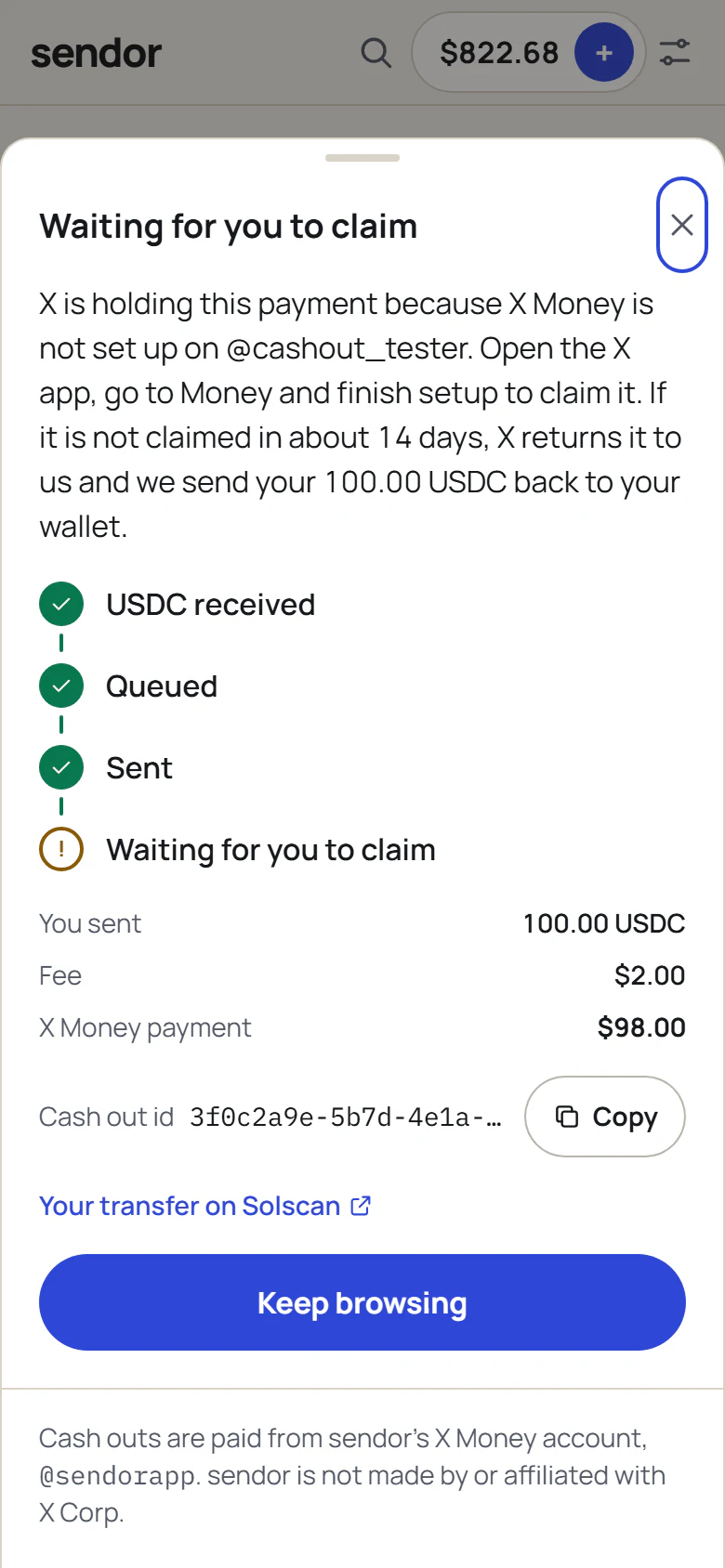
What each status means
- Queued
- We received your USDC. Your X Money payment is in line.
- Sent
- We sent the dollars to your handle. Open Money in the X app to see them.
- Claimable
- X is holding the payment because X Money is not set up on your account. How to claim it
- Returned
- The payment was not claimed and X returned it to us. We sent your USDC back to your wallet.
- Failed
- We could not send the payment. We sent your USDC back to your wallet and show the reason.
Limits
Limits and the 24 hour hold
These are starting limits. They can change, and sendor always shows the ones that apply to you. sendor also has a daily total across everyone; payments over a limit are held for review, not lost.
Cash out opens 24 hours after your last deposit. X Money payments between people can be disputed. The hold stops a disputed payment from being clawed back after the dollars have already left.
| Smallest deposit | $20 |
|---|---|
| Deposits per day | $500 |
| Deposits per week | $2,000 |
| New accounts, first 7 days | $200 a day |
| Smallest cash out | $20 |
| Largest single cash out | $2,000 |
| Cash out opens | 24 hours after a deposit |
Cash out
Claimable payments
If X Money is not set up on your X account, X holds the payment for about 14 days so you can claim it. Open the X app, go to Money and finish setup to claim it.
If it is not claimed in time, X returns it to us and we send your USDC back to your wallet. X asks for your name, date of birth, Social Security number and address to set up X Money.
iPhone and Android
Apple Pay and card, in the apps
The apps add dollars with Apple Pay or a card through a licensed partner, or by sending crypto from another wallet. The partner may charge its own fee, shown before you pay. Money you add on the web shows up in the app, because it is the same wallet.
The apps: coming soon.
Promises
What we never do
- We never ask for your X password. You sign in with X on X’s own page.
- We never read or control your X Money account. You send each payment yourself.
- We never add a payment from an X account that is not yours, and we never send a cash out to one.
- We never charge you to add dollars.
- We never keep your balance. It is USDC in your own wallet, and you can export the key.
- We never ask you to pay any handle but @sendorapp, and we never ask for money in a DM.
- We have no token. Anyone selling a sendor token is not us.
Questions this page does not answer are in the FAQ.